


If your team is still fighting a template-locked CMS to launch a new landing page, sync content to a mobile app, or push a product update across three markets at once, you already know the real cost. It isn't the license fee. It's every week your content team waits on engineering, and every campaign that ships late because the platform wasn't built for where content lives today.
That's why so many engineering and marketing leaders decide to migrate to headless CMS. A headless CMS separates content from presentation and delivers structured content via APIs, so the same piece of content can power your website, app, kiosk, or partner integrations without being rebuilt for each. This API-first content management approach is one of the highest-leverage infrastructure decisions a growing company can make when done with a plan. Done without one, it turns into a six-month rebuild with broken URLs and an editorial team that hates the new tool.
This guide covers why teams are moving away from traditional CMS platforms, what changes technically and operationally when you do, and a step-by-step plan for migrating without losing content, rankings, or your team's patience along the way.
Traditional CMS vs Headless CMS: What Actually Changes
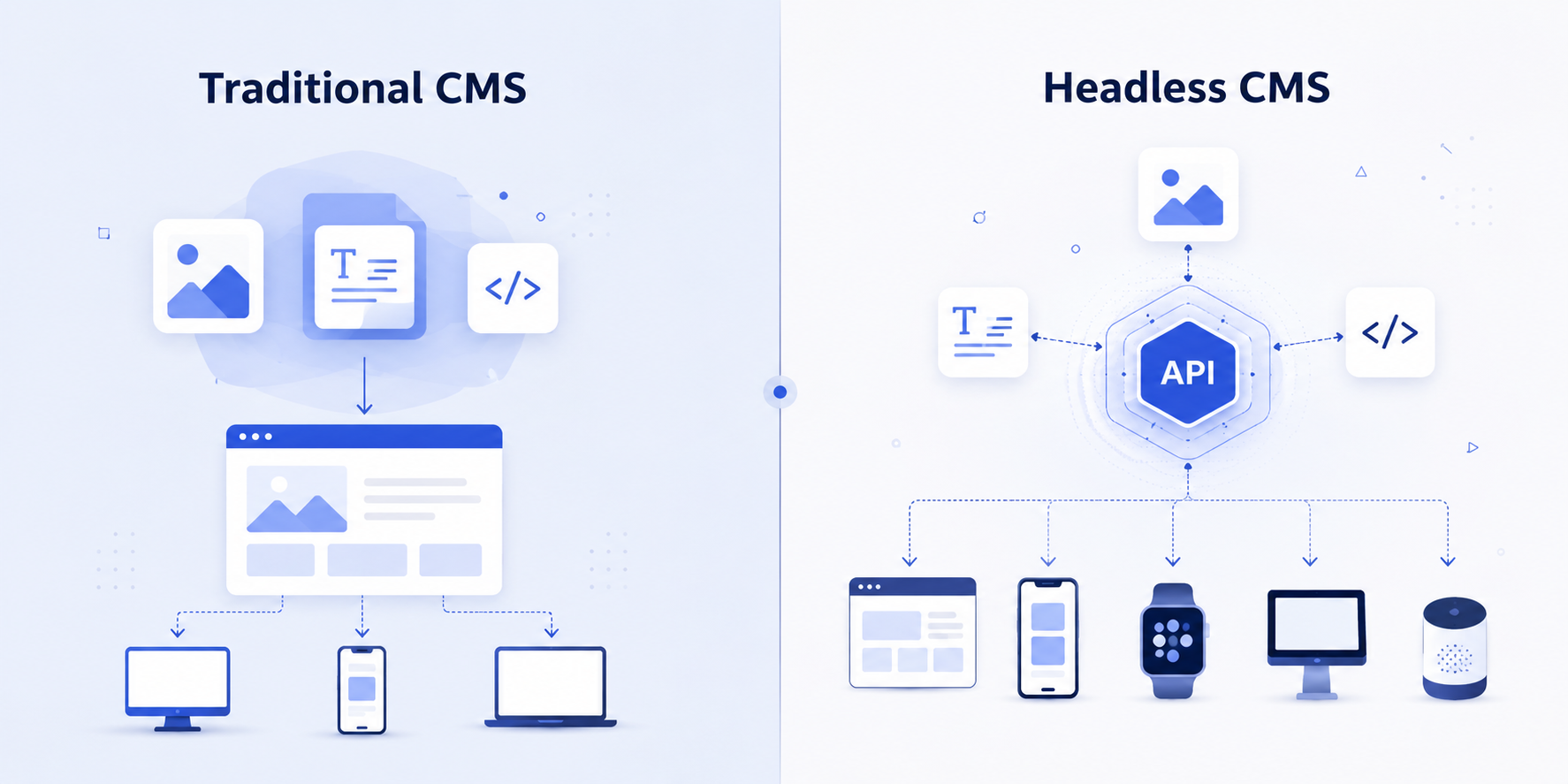
In a traditional (monolithic) CMS, content and presentation live in the same system. Your blog post is tied to a template, your template is tied to a theme, and your theme is tied to a specific frontend. That's fine when you're publishing to one website. It breaks down the moment you need that same content on a mobile app, a partner site, or a digital display, because now you're either duplicating content by hand or building fragile scraping workarounds.
A headless CMS removes the presentation layer entirely. Content is stored as structured data and delivered through REST or GraphQL APIs to whatever frontend needs it, whether that's a Next.js site, a native app, or a system you haven't built yet.
For a deeper breakdown of the two architectures, see our full comparison: Headless CMS vs Traditional CMS: What's the Difference and Which Should I Choose?
Traditional CMS | Headless CMS | |
|---|---|---|
Architecture | Content and frontend tightly coupled | Content repository decoupled from presentation |
Content delivery | Rendered HTML from templates | Structured content via API (JSON) |
Frontend flexibility | Locked to the CMS's themes or plugins | Framework-agnostic; use React, Next.js, Vue, or anything else |
Omnichannel reach | One channel at a time, often duplicated manually | One content model, delivered to every channel |
Developer workflow | Frontend and backend release together | Frontend and backend teams ship independently |
Scaling | Scale the whole stack together | Scale content and frontend infrastructure separately |
This isn't a small technical distinction. It changes who owns which part of the stack, how fast your team can ship, and how much your content strategy is constrained by what your CMS vendor decided a page should look like.
Why You Should Migrate to a Headless CMS
It's built for omnichannel, not just your website
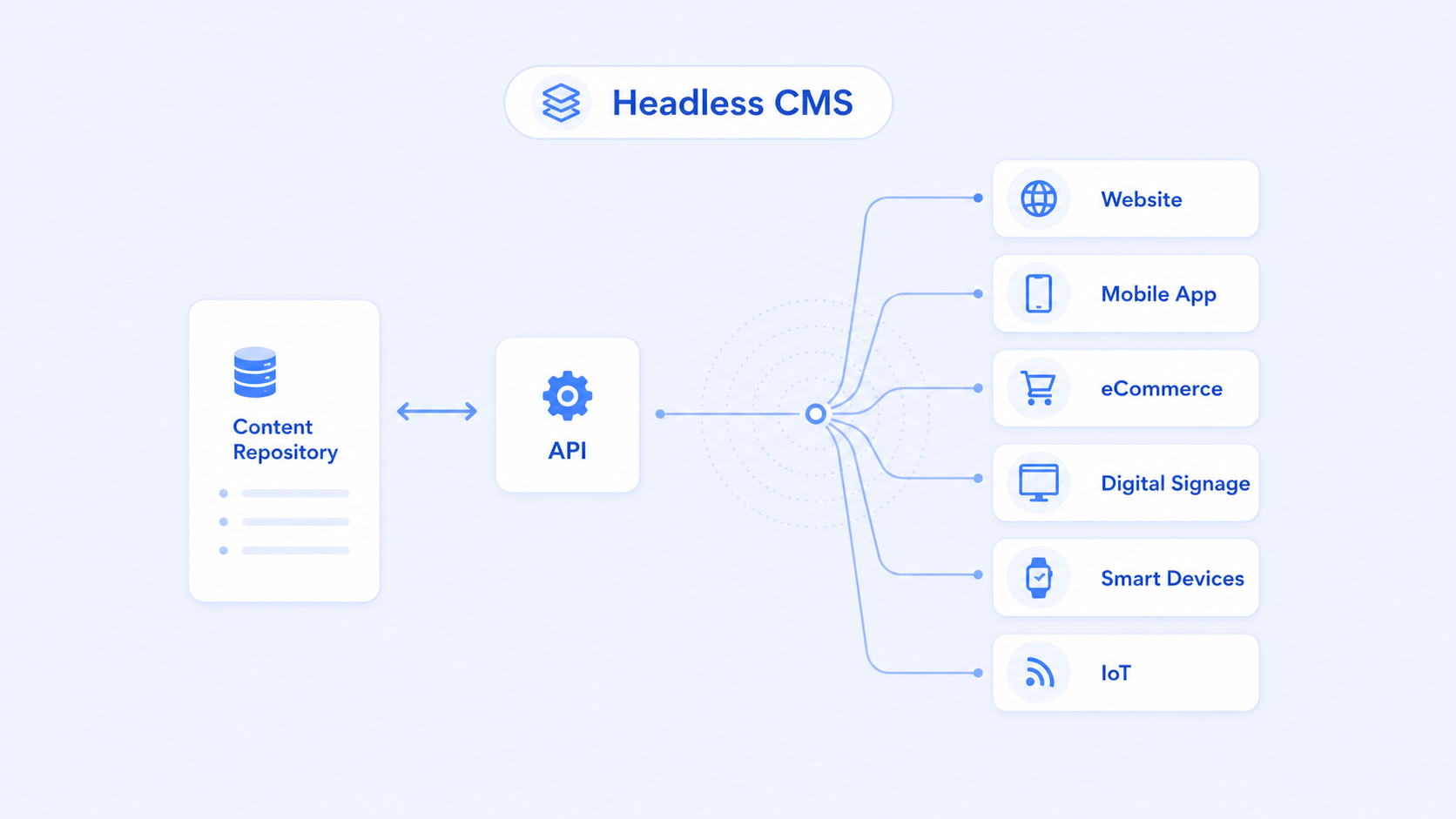
The single biggest driver behind most headless CMS migrations is channel expansion. Once content lives in a headless CMS, it's created once and pulled into every channel through the API, rather than re-entered or duplicated for each new surface your business adds.
01.Developers stop waiting on the CMS, and the CMS stops waiting on developers
Because the frontend isn't tied to the CMS's templating engine, your engineering team can build with whatever framework fits the project, and iterate on the frontend without touching content infrastructure. This is usually the point where teams stop treating "the website" and "the CMS" as the same project.
02.Faster sites and better SEO outcomes
Headless setups pair naturally with static generation and edge caching, since the frontend can be pre-rendered or served from a CDN independently of the content backend. Faster load times feed directly into Core Web Vitals, which is one of the more direct levers you have over search performance. A decoupled frontend also makes server-side rendering and structured data easier to control precisely, which matters for both crawlability and page speed.
03.A smaller attack surface
When your CMS admin panel and your public-facing site are the same system, a vulnerability in one is a vulnerability in both. Decoupling them means the API surface exposed to the public is smaller and easier to lock down, and a breach in the delivery layer doesn't hand someone the keys to your content backend.
04.Content operations stop fragmenting
Without a headless setup, teams managing content across web, app, and campaign microsites often end up with the same asset living in three places, each slightly out of sync. A single content hub built on a content-as-a-service model eliminates that duplication. It makes governance, localization, and approvals something you configure once instead of rebuilding per channel, which is the operational core of a composable content strategy.
Frequently Asked Questions
It depends on content volume and channel complexity, but a mid-sized website migration typically runs eight to sixteen weeks from content audit to launch. Multi-region or multi-brand migrations with heavier content federation needs usually run longer.
Usually not, unless you're actively planning a second channel (an app, a partner integration, multiple regional sites). For a single website with no near-term channel expansion, a traditional or hybrid CMS is often faster and cheaper to run.
Not if redirects, metadata, and rendering are planned properly before launch. Most ranking loss during a CMS migration comes from missed 301 redirects or a rendering setup that hides content from crawlers, not from the architecture itself.
A headless CMS has no built-in frontend at all; you build everything on top of the API. A decoupled CMS still ships a default frontend but lets you replace it. Most modern "headless" platforms are technically decoupled once you add a frontend framework on top.
Signs You've Outgrown Your Current CMS
Not every business needs to migrate right now. Here's what usually signals that it's time to look seriously at a headless CMS migration:
01. You're duplicating content by hand across channels.
If your team is copy-pasting the same product description into three systems, that's manual work a headless CMS eliminates by design.
02.Every content change needs a developer.
If updating a hero banner or FAQ requires a deploy, your CMS is doing engineering's job for the wrong reasons.
03. You're planning a new channel.
Mobile app, partner API, digital signage, voice, or anything beyond the website is a strong signal, since a monolithic CMS wasn't built to serve those.
04. Your frontend is boxed in by templates.
If your design team keeps hitting walls because "the CMS doesn't support that layout," the coupling between content and presentation is the actual constraint.
05. You're scaling into multiple regions or brands.
Localization, multi-brand governance, and role-based approvals get exponentially harder on a system that wasn't built for structured, reusable content.
If two or more of these sound familiar, the migration conversation is worth having.
Where Headless CMS Isn't the Right Call
Headless isn't the right move for everyone, and it's worth being upfront about that before you commit budget to a migration.
01. You lose built-in visual editing.
Most headless platforms don't offer the drag-and-drop, what-you-see-is-what-you-get page building that a traditional CMS gives non-technical editors out of the box. Some platforms have closed this gap with visual editors, but it's not universal, and it's worth checking before you assume it's included.
02.It shifts real work onto engineering.
Someone still has to build the frontend, wire up the API, and maintain it. If your team doesn't have that capacity in-house or through a partner, a headless migration adds a dependency rather than removing one.
03. Simple, single-channel sites may not need it.
If you're publishing to one website with no plans to expand to other channels, a monolithic CMS can be faster and cheaper to run, and the architectural upside of headless won't show up in your day-to-day.
04. Upfront cost is usually higher. Between platform fees, frontend development, and migration effort, the initial investment tends to be higher than staying put, even though the long-term operating cost is often lower.
If none of these outweigh the reasons you're considering headless in the first place, the migration is worth planning properly, which is what the rest of this guide walks through.
How to Migrate to a Headless CMS: A Step-by-Step Plan
A headless CMS migration fails less often because of the technology and more often because of a rushed plan. Here's the sequence that keeps a migration on track.
01. Define why you're migrating before you touch anything
Get specific about what you're solving for: faster time-to-market, a new mobile app, better editorial autonomy, or lower long-term platform costs. This decision shapes your content model, your platform shortlist, and your rollout order, so it needs to be explicit and shared before any technical work starts.
02. Run a full content audit
Catalog everything: pages, posts, product data, media, forms, and anything else tied to your current CMS. For each piece, decide whether it gets migrated as-is, restructured, or retired. This is also the point to identify content that's high-value for SEO, since anything ranking well needs a deliberate plan, not an accidental drop.
03. Design a channel-agnostic content model
This is the step teams underestimate most. Instead of migrating pages as unstructured blocks, break content into reusable, structured fields (title, body, media, metadata) that can be assembled differently for each channel. A content model built around your website's current layout will fight you the moment you add a second channel, so design for reuse from the start, not just for what your site looks like today.
04. Shortlist and select your headless CMS
Evaluate platforms against your actual requirements: API architecture (REST vs GraphQL), editor experience for non-technical teams, localization and role-based governance, compliance needs like SOC 2 or GDPR, and how well it integrates with your existing stack. The right CMS is the one that matches your team's technical capacity and your content's complexity, not the one with the longest feature list.
05. Build your content API and set up environments
Once your platform is chosen, configure content types, roles, and permissions, and set up staging and production environments before any content moves. Decide on REST or GraphQL based on your frontend's needs, and lock down public API access to only what should be exposed.
06. Migrate and transform your content
Export from your existing CMS using its available tools or APIs, then transform the data to match your new content model; this usually means cleaning up formatting, converting rich text, and mapping old fields to new structured types. Run imports in batches, validate as you go, and plan for a category of content (custom widgets, personalization, embedded forms) that won't migrate cleanly and needs manual handling.
07. Build and test the frontend
With content flowing through the API, build the frontend using whatever framework fits the project, then test thoroughly across devices, content types, and edge cases like empty states and broken references. This is also where you confirm rendering strategy (SSR, SSG, or a hybrid) actually supports both performance and crawlability.
08. Protect your SEO through the switch
Map every existing URL to its new destination and set up 301 redirects before launch, not after. Carry over metadata, structured data, and canonical tags, and confirm your rendering approach lets search engines see your content rather than an empty shell of client-side JavaScript. Monitor rankings and crawl errors closely for the first few weeks post-launch.
09. Launch in phases and train your team
Roll out a single section or non-critical property first, gather feedback, and expand from there rather than flipping everything at once. Train content editors on the new workflows and make sure developers know where to troubleshoot API and permission issues before the whole team depends on the new system daily.
Common Headless CMS Migration Challenges
Most migration problems fall into a handful of predictable categories:
01. Underestimating content complexity. Rich text with embedded styling, nested components, and nonstandard formatting rarely transfers cleanly. A thorough audit before migration prevents this from becoming a mid-project surprise.
02. Losing SEO equity from poor redirect planning. URL structures almost always change during a migration. Without a complete redirect map, you lose the search authority you've already earned.
03. Skill gaps on both sides. Content teams need to learn structured content modeling instead of page-based editing, and technical teams take on more responsibility for the presentation layer they no longer get "for free" from the CMS.
04.No dedicated testing phase. Rushing a launch without testing content delivery, permissions, and edge cases across every channel is the most common reason migrations need a second, unplanned round of fixes right after go-live.
05. Misaligned stakeholders. Migration touches marketing, SEO, legal, localization, and engineering. Leaving any of them out until late in the process is a reliable way to discover a blocking requirement after the build is already underway.
How UPDOT Approaches Headless CMS Migration
We migrate teams onto headless CMS platforms as an official Hygraph partner and a Payload CMS partner, which means we're not learning the platform alongside the client. We've moved content off Drupal, WordPress, Contentful, and Sanity to structured, API-first systems without downtime, and we treat content modeling, not the CMS interface, as the real work of a migration.
Every migration we run starts the same way: a content and stack audit, a content model built for where your channels are headed rather than just where they are today, and a redirect and SEO plan drafted before a single page moves. Our web engineering team builds the frontend in parallel with the CMS setup, so you're not stuck waiting for one to finish before the other starts, and our DevOps and cloud team handles the infrastructure side so performance and monitoring are in place from day one, not bolted on after launch.
Thinking About Migrating to a Headless CMS?
If your current CMS is the reason your team can't ship as fast as your business needs to, that's usually not a content problem, it's an infrastructure decision that's overdue. We'll look at your current stack, your content complexity, and where your channels are headed, and give you a straight answer on whether headless is the right move and what the migration actually looks like for your team. Talk to us and let's map it out.